
Stop Yelling at Chatbots: A Beginner’s Guide to "Agentic AI" (Part 1)
Stop Yelling at Chatbots: A Beginner’s Guide to "Agentic AI" (Part 1)
Ever type a huge, detailed question into ChatGPT, only for it to give you a confident-but totally wrong-answer?
Or maybe it started following your instructions perfectly, then got distracted halfway through and forgot what it was doing. Frustrating, right? You’re left thinking, "Why is this 'super-intelligence' so bad at following a simple list?"
Here is the secret: Asking a chatbot one giant, messy question is a recipe for disaster.
If you want AI that works for you-like a reliable digital employee-you need to stop treating it like a magic 8-ball and start treating it like a system. This is called Agentic AI.
Don't let the fancy name scare you. It just means giving the AI a blueprint to follow so it doesn't get confused. In this series, we are going to master these blueprints.
Today, we start with the "Big Three" basics: Chaining, Routing, and Parallelization.
1. Prompt Chaining (The Assembly Line)
Imagine you run a car factory. You wouldn't hire one guy and say, "Build me a Ferrari in 5 minutes. Go." He’d panic and build a bicycle with an engine.
Instead, you use an Assembly Line. One person adds the wheels, the next adds the engine, and the last person paints it red.
Prompt Chaining is exactly that, but for AI.
How It Works
Instead of one massive prompt ("Research AI trends, summarize them, and write an email to my boss"), you break it into a chain. The result of Step 1 becomes the instructions for Step 2.
-
Step 1 (The Researcher): "Read this article and list the top 3 trends."
-
Step 2 (The Analyst): "Take those 3 trends and find data to back them up."
-
Step 3 (The Writer): "Use that data to write a professional email."
Why Use It?
-
It’s Reliable: The AI focuses on one small task at a time, so it makes fewer mistakes.
-
It’s Fixable: If the email sounds weird, you know the problem is in Step 3, not Step 1.
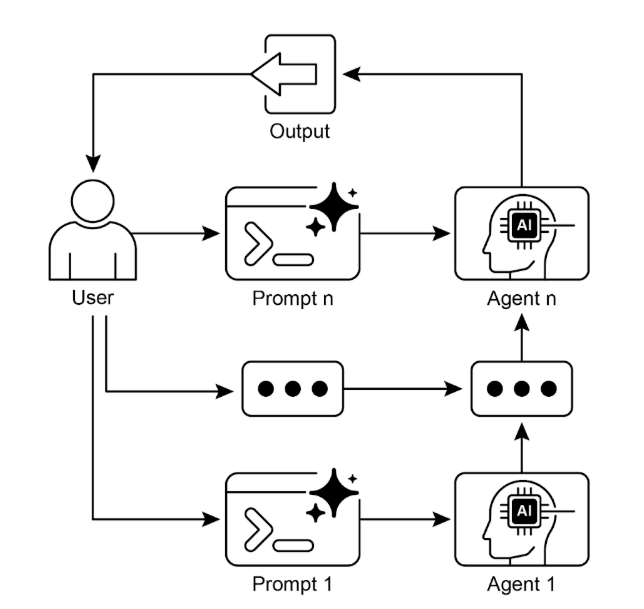
Fig. 1: Prompt Chaining Pattern: Agents receive a series of prompts from the user,
    with the output of each agent serving as the input for the next in the chain.
2. Routing (The Traffic Controller)
Imagine walking into a massive hotel. You don't just stand in the lobby and scream, "My sink is broken!"
You go to the front desk. The receptionist listens to you and decides where you need to go.
-
"Hungry?" > Go to the Restaurant.
-
"Sink broken?" > Send Maintenance.
-
"Checking out?" > Go to the Cashier.
Routing is the AI version of that receptionist.
How It Works
You set up a "Router" (a small, fast AI) at the front door. It looks at what the user wants and sends them to the right specialist.
-
User: "I want a refund." > Router sends them to the Support Agent.
-
User: "Tell me a joke." > Router sends them to the Chatty Agent.
-
User: "What’s the weather?" > Router sends them to the Weather Tool.
Why Use It?
-
Specialization: You don't want your "Funny Joke Bot" trying to process a credit card refund. Routing ensures the right expert handles the job.
-
Cost & Speed: Simple questions get sent to cheap, fast models. Hard questions go to smart (expensive) ones.
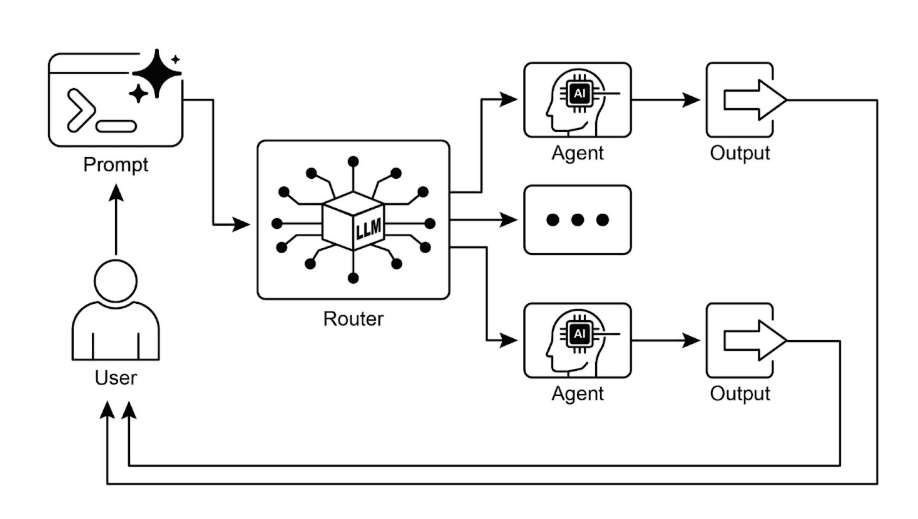
Fig.2: Router pattern, using an LLM as a Router
3. Parallelization (The Master Chef)
Imagine a chef cooking a Thanksgiving dinner. They don't boil the potatoes, wait 20 minutes for them to finish, then start chopping carrots, then put the turkey in. That would take all day!
A real chef does everything at once. The water boils while the turkey roasts while the veggies are chopped.
Parallelization gives your AI this multitasking superpower.
How It Works
If you have tasks that don't depend on each other, run them simultaneously (in parallel). Let’s say you need to "Research Apple's Stock Performance."
-
Agent A checks Google News.
-
Agent B checks the Stock Market.
-
Agent C looks at Reddit sentiment.
Boom: All three start at the exact same second. You get the results 3x faster.
Why Use It?
-
Speed: Drastically cut down waiting time.
-
The Full Picture: You get different perspectives (News + Data + Social) instantly.
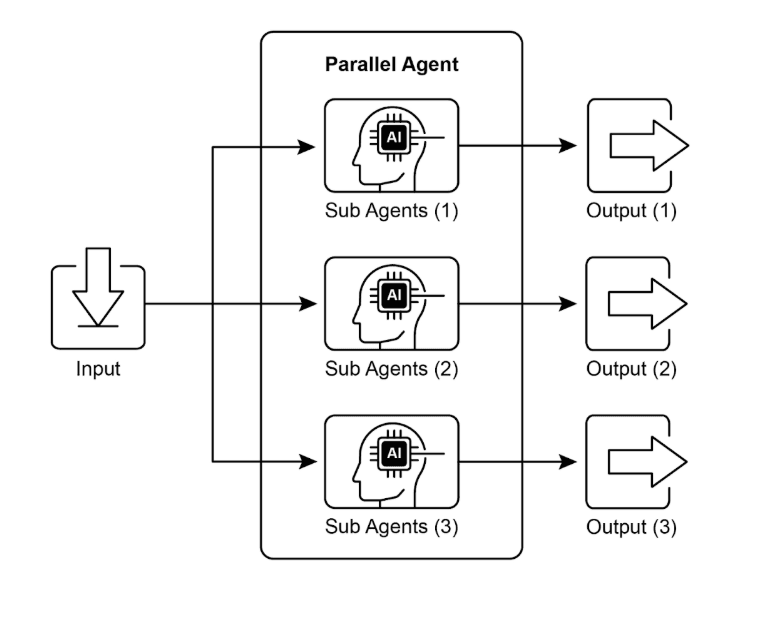
Fig.3. Example of parallelization with sub-agents
Putting It All Together: The "Personal Travel Assistant"
Let’s see how our three new friends work together to plan a vacation.
You say: "Plan a trip to Tokyo. I love sushi and history."
-
Routing (The Boss): hears "Plan a trip" and sends the request to the Travel Planner Agent.
-
Parallelization (The Team): The Planner instantly fires off three tasks at once:
a. Task 1: Check flight prices.
b. Task 2: Find top-rate sushi spots.
c. Task 3: List historical temples.
- Chaining (The Finisher): The data comes back, and the assembly line starts:
a. Step 1: Combine all the info.
b. Step 2: Draft a 3-day itinerary.
c. Step 3: Format it into a beautiful email for you.
And there you have it! A smart, complex system built from three simple blocks.
What's Next?
We’ve covered the basics:
-
Chaining handles the steps.
-
Routing directs the traffic.
-
Parallelization speeds it up.
But... what happens when the AI makes a mistake? How does it fix itself? And how does it do things, like book that flight or check your calendar?
Stay tuned for Part 2, where we’ll dive into Reflection (Self-Correction) and Tool Use!
About the Author

Sanjay Gawatiya
Sanjay Gawatiya is a Technical Lead at Infominez, specializing in enterprise architecture and AI-driven systems. He writes about modern, adaptive architectures, agent-based systems, and the future of enterprise technology in the AI era.
About the Author
Sanjay Gawatiya
Sanjay Gawatiya is a Technical Lead at Infominez, specializing in enterprise architecture and AI-driven systems. He writes about modern, adaptive architectures, agent-based systems, and the future of enterprise technology in the AI era.