
Stop Overthinking It: How AI Learns to Fix Itself, Use Tools, and Think Ahead (Part 2)
Stop Overthinking It: How AI Learns to Fix Itself, Use Tools, and Think Ahead (Part 2)
Welcome back! In Part 1, we learned the "Big Three" basics of building reliable AI systems: Chaining (the assembly line), Routing (the traffic controller), and Parallelization (the master chef).
But we left a few questions hanging:
-
What if the AI makes a mistake? (It will. They all do.)
-
How does it actually do things like book a flight or check your calendar?
-
Can it think ahead and create a game plan before diving in?
Today, we're answering all three. Let's talk about Reflection, Tool Use, and Planning—the patterns that turn your AI from a text generator into a self-correcting, action-taking, strategic thinker.
4. Reflection (The Editor)
Imagine you're writing an important email to your boss. You type it out quickly, then stop and think, "Wait, does this sound rude?" You read it again, cringe, and rewrite it to sound professional.
Reflection is giving the AI that same superpower.
How It Works
After the AI generates something (code, text, analysis), it doesn't just spit it out. Instead, it:
-
Generates the first draft.
-
Critiques its own work ("Is this correct? Any bugs? Does it make sense?").
-
Refines based on the critique.
-
Repeats until it's satisfied (or you tell it to stop).
Two Ways to Do It
| Approach | What It Means |
|---|---|
| Self-Reflection | The same AI reviews its own output ("I wrote it, so I'll fix it") |
| Producer-Critic | Two separate AIs: One generates, the other critiques ("Fresh eyes catch more mistakes") |
Real Example: Code Generation You ask the AI: "Write a Python function to calculate compound interest."
Without Reflection:
-
AI writes code.
-
You run it.
-
It crashes because of a typo.
-
You come back and ask it to fix the bug.
With Reflection:
-
AI writes code.
-
AI reviews code: "This will fail if the user passes a negative number."
-
AI rewrites code with input validation.
-
You get working code the first time.
Why Use It?
-
Higher Quality: Catches errors before you see them.
-
Less Back-and-Forth: Fewer "oops, try again" cycles.
The Trade-off
-
Slower: Each reflection loop takes time.
-
More Expensive: You're paying for multiple AI calls instead of one.
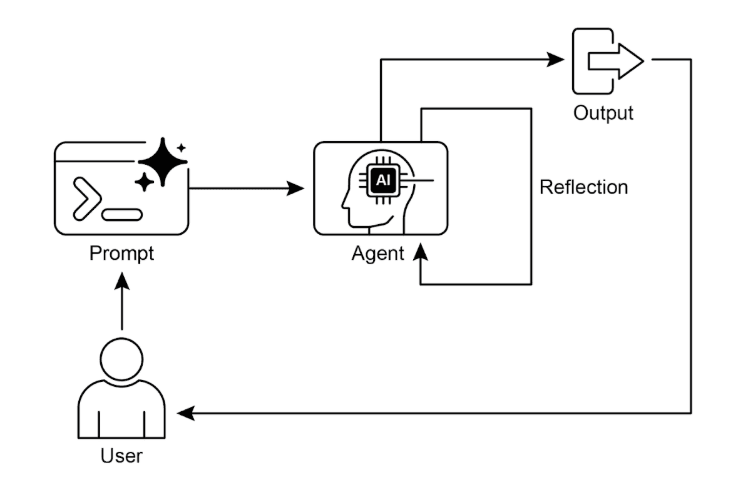
Fig. 1: Reflection design pattern, self-reflection
5. Tool Use (The Handyman)
Imagine you hire a handyman to fix your house. You hand them a toolbox with a hammer, screwdriver, drill, and saw. They don't try to hammer in a screw or saw through a wire, they use the right tool for the job.
Tool Use gives your AI that same toolbox.
How It Works
Up until now, AI could only generate text. It couldn't:
-
Check the actual weather.
-
Do complex math accurately.
-
Send a real email.
-
Look up data in your database.
With Tool Use, the AI can call external functions and APIs:
User: "What's the weather in Tokyo tomorrow?"
Without Tools:
-
AI makes up an answer based on training data (which is outdated).
-
Result: "It will probably be sunny!" (Wrong.)
With Tools:
-
AI thinks: "I need real-time data."
-
AI calls weather_api("Tokyo", "tomorrow").
-
API returns: {"temp": 15, "conditions": "rainy"}.
-
AI responds: "It will be 15°C and rainy." (Correct!)
Common Tools
| Tool Type | Examples |
|---|---|
| Information | Google Search, Weather API, Stock Market Data |
| Computation | Calculator (for precise math), Code Executor |
| Action | Send Email, Book Calendar Event, Control Smart Home |
| Database | Query your CRM, Check Inventory, Pull User Data |
Real Example: The Personal Assistant
You say: "Schedule a meeting with Sarah next Tuesday at 2pm."
The AI:
-
Calls check_calendar("next Tuesday", "2pm") → Sees you're free.
-
Calls check_calendar("Sarah", "next Tuesday", "2pm") → Sees Sarah is free.
-
Calls create_meeting("Sarah", "next Tuesday", "2pm") → Books it.
-
Responds: "Done! Meeting scheduled for Tuesday at 2pm."
Why Use It?
Because text alone can't change the world. If you want AI that actually does things, it needs tools.
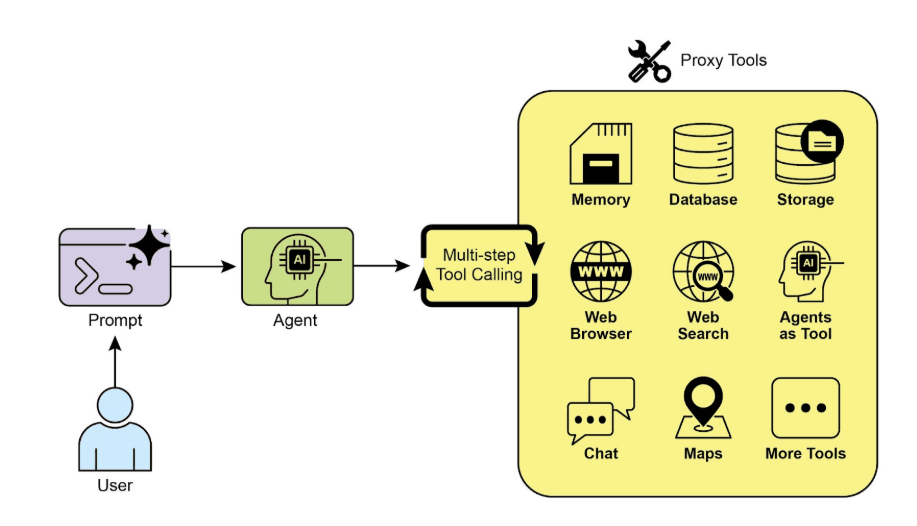
Fig.2: Some examples of an Agent using Tools
6. Planning (The Project Manager)
Imagine you're building a house. You don't just show up with a hammer and start whacking wood randomly. You hire a project manager who creates a detailed plan:
-
Lay the foundation.
-
Build the frame.
-
Install plumbing and electrical.
-
Add walls and roof.
-
Paint and finish.
Planning gives your AI that project manager brain.
How It Works
When you give the AI a complex, multi-step goal, it doesn't just start executing immediately. Instead, it:
-
Analyzes the goal.
-
Creates a step-by-step plan.
-
Executes each step in order.
When to Use Planning
Ask yourself: "Do I already know HOW to do this, or does the AI need to figure it out?"
| Scenario | Pattern to Use |
|---|---|
| "Send this specific email" (you know the exact steps) | Chaining (fixed workflow) |
| "Research our competitors and suggest a strategy" (unknown steps) | Planning (AI figures it out) |
Real Example: Building a Website
You say: "Build me a personal portfolio website."
Without Planning:
-
AI starts writing HTML randomly.
-
Forgets CSS.
-
Doesn't test anything.
-
You get a broken mess.
With Planning:
Step 1: Create the Plan
-
Design wireframe (layout structure)
-
Write HTML structure
-
Style with CSS
-
Add JavaScript interactivity
-
Test on different browsers
-
Deploy to hosting
Step 2: Execute the Plan
-
AI works through each step methodically.
-
You get a complete, working website.
Why Use It?
-
Handles Complexity: Breaks down overwhelming tasks into manageable pieces.
-
Reduces Errors: Strategic thinking prevents "oops, I forgot about X."
-
Transparency: You can see the plan before it executes (and adjust if needed).
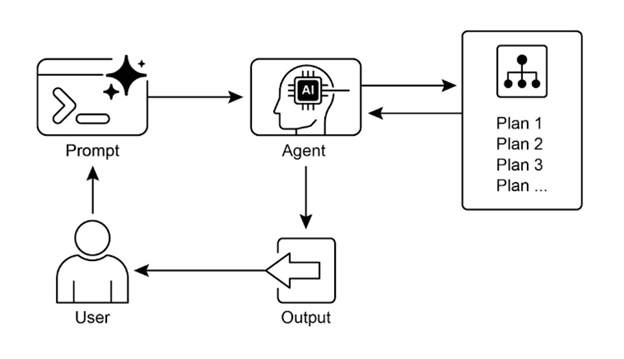
Fig.3; Planning design pattern
Putting It All Together: The "AI Research Assistant"
Let's combine all six patterns from Part 1 and Part 2 to build something powerful: an AI Research Assistant that analyzes your competitors.
You say: "Research our top 3 competitors and create a strategic report."
Here's what happens behind the scenes:
- Planning (The Strategist)
AI creates a research plan:
- Identify top 3 competitors
- For each competitor:
- Gather recent news
- Analyze social media sentiment
- Check financial data
- Synthesize findings
- Generate strategic recommendations
- Routing (The Dispatcher)
AI sees different types of tasks and routes them:
-
News research → Web Search Agent
-
Financial data → Finance API Agent
-
Social sentiment → Social Media Agent
- Parallelization (The Team)
AI researches all 3 competitors at the same time (not one after another).
- Tool Use (The Doer)
Each agent uses real tools:
-
Google Search for news
-
Reddit API for sentiment
-
Yahoo Finance API for stock data
- Chaining (The Assembly Line)
Results flow through the pipeline:
Gather data → Analyze trends → Write report → Format as PDF
6. Reflection (The Quality Check)
Before sending you the report:
-
AI reviews it: "Did I miss any competitors? Are my sources credible?"
-
AI refines the report.
-
You get a polished, accurate final product.
Result: You get a comprehensive competitive analysis in minutes instead of days.
What's Next?
We've now covered all the foundational patterns:
Part 1:
-
Chaining – Sequential steps
-
Routing – Smart delegation
-
Parallelization – Speed through concurrency
Part 2:
-
Reflection – Self-correction
-
Tool Use – Real-world actions
-
Planning – Strategic thinking
But there's one more level: What if you had multiple AI agents working together as a team?
Stay tuned for Part 3, where we explore Multi-Agent Systems, the pattern that lets you build entire AI organizations!
About the Author

Sanjay Gawatiya
Sanjay Gawatiya is a Technical Lead at Infominez, specializing in enterprise architecture and AI-driven systems. He writes about modern, adaptive architectures, agent-based systems, and the future of enterprise technology in the AI era.
About the Author
Sanjay Gawatiya
Sanjay Gawatiya is a Technical Lead at Infominez, specializing in enterprise architecture and AI-driven systems. He writes about modern, adaptive architectures, agent-based systems, and the future of enterprise technology in the AI era.