
Over-The-Air (OTA) Updates in React Native
Over-The-Air (OTA) Updates in React Native
Overview
Over-The-Air (OTA) updates in React Native allow teams to deliver JavaScript and asset updates directly to users without requiring a new submission to the Apple App Store or Google Play Store. This mechanism enables faster bug fixes, UI improvements, and configuration changes while maintaining compliance with platform guidelines.
OTA updates are commonly used for non-native changes such as business logic adjustments, UI refinements, text updates, and feature flag management.
Key Benefits of OTA Updates
-
Faster delivery of bug fixes without app store approval delays
-
No manual update action required from users
-
Immediate distribution of JavaScript and asset changes
-
Reduced dependency on app store release cycles
-
Built-in rollback support for faulty updates
-
Controlled and staged rollout to subsets of users
-
Smaller update payloads compared to full app releases
-
Faster development and iteration cycles
-
Support for remote feature toggling and experimentation
-
Reduced operational and maintenance costs
What OTA Means in React Native
What Can Be Updated via OTA
-
Business logic written in JavaScript or TypeScript
-
UI and layout changes
-
Text, color schemes, and static image assets
-
Feature flags and conditional flows
What Cannot Be Updated via OTA
-
Native code (Java, Kotlin, Objective-C, Swift)
-
Native dependencies or SDK versions
-
App permissions
-
Changes that alter the core purpose or behavior of the app beyond platform policies
Note: Any change involving native code or platform-level behavior requires a full app store release.
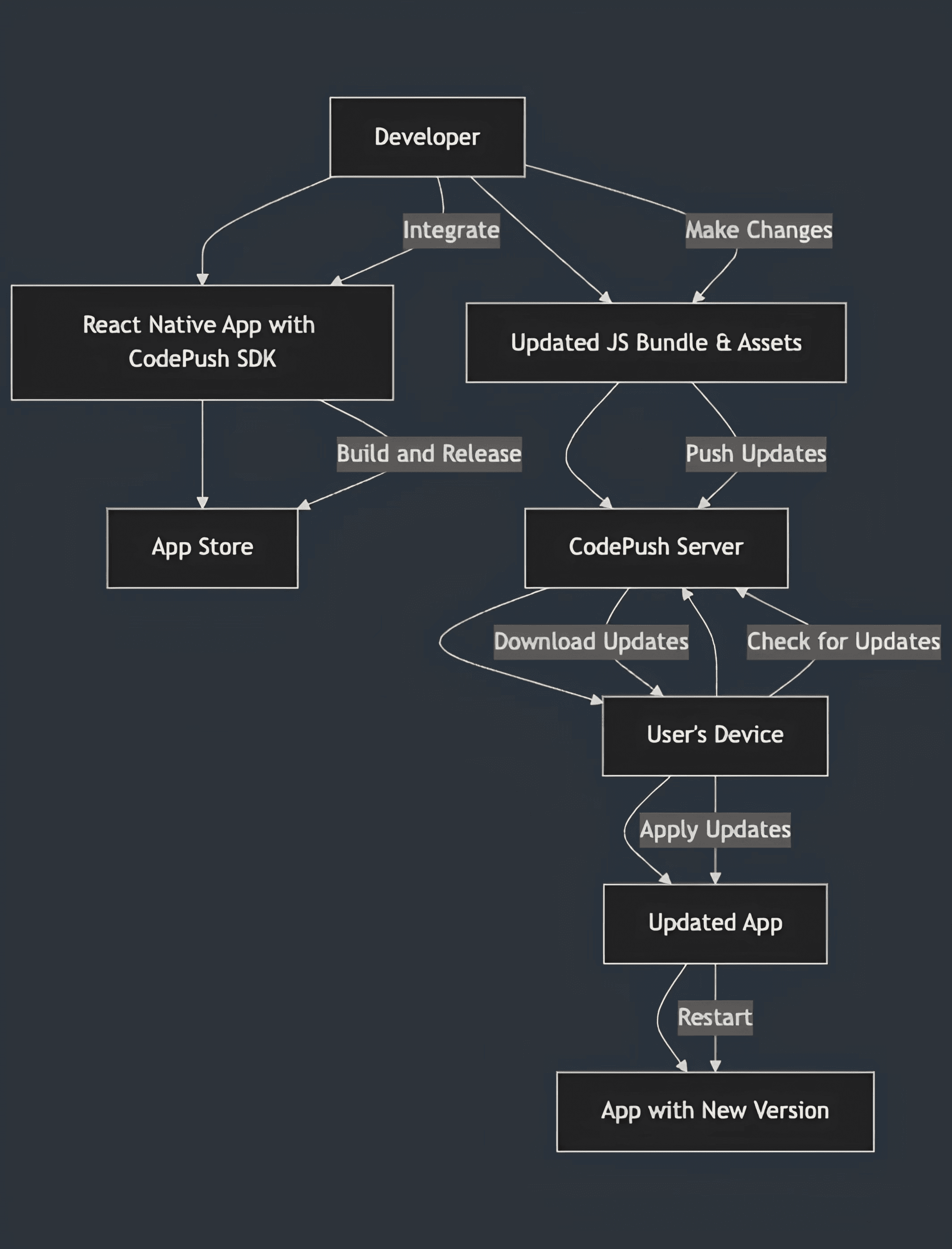
High-Level OTA Update Flow
-
User installs the app from the App Store or Play Store (includes an embedded JavaScript bundle).
-
App launches on the device.
-
OTA SDK (e.g., CodePush or Expo Updates) checks for available updates.
-
If an update is found, the new JavaScript bundle is downloaded securely.
-
The app reloads and runs the updated bundle, typically without user awareness.
OTA Working Architecture
Internal OTA Flow
Step 1: Application Startup
-
Native application launches
-
OTA SDK initializes
Step 2: Version and Update Check
The app sends metadata to the OTA server, including: - App version - Platform (iOS or Android) - Runtime version - Deployment environment (e.g., Staging or Production)
The server responds with either: - No update available, or - Update metadata along with a secure download URL
Step 3: Downloading the Update
-
JavaScript bundle and related assets are downloaded
-
Stored in the app’s internal, sandboxed storage
-
Not accessible publicly
Step 4: Integrity and Safety Checks
Before applying the update, the SDK performs: - Bundle hash verification - Signature validation - Compatibility checks against the app version
If any validation fails, the update is rejected.
Step 5: Bundle Selection Logic
If OTA bundle exists:

      Load OTA bundle

Else:

      Load embedded bundle
Step 6: Update Installation Timing
Common installation modes include: - On next app restart - On next app resume - Immediate installation (used cautiously)
Rollback Mechanism
If an OTA update causes the app to crash on launch or fails during JavaScript execution, the OTA SDK automatically marks the update as invalid. On the next app launch, the SDK reverts to the last known stable JavaScript bundle.
Why Rollback Is Essential
-
Prevents infinite crash loops caused by faulty updates
-
Ensures application availability and stability
-
Protects users from being locked out of the app
Rollback is a critical safety feature when delivering automatic updates.
OTA Server Responsibilities
The OTA server functions as a versioned distribution system for JavaScript bundles. Its responsibilities include:
-
Storing uploaded JavaScript bundles and assets
-
Managing metadata (app version, platform, environment)
-
Verifying checksums and compatibility
-
Handling staged rollouts and percentage-based deployments
-
Supporting rollback flags and update invalidation
When the app checks for updates, the server evaluates the request and responds with either update metadata or a no-update response.
Common OTA Solutions
CodePush
-
Designed specifically for React Native
-
Mature and production-proven
-
Supports staged rollouts
-
Built-in rollback and failure detection
CodePush Setup
Installation
npm install react-native-code-push
iOS Configuration
cd ios && pod install
Wrap the Root Component
The application root component must be wrapped with CodePush to enable OTA updates.
Update Strategies
-
InstallMode.ON_NEXT_RESTART
-
InstallMode.IMMEDIATE (use with caution)
-
Staged rollouts (e.g., 20% of users initially)
Example:
code-push release-react MyApp ios --rollout 20%
Platform Policy Considerations
Apple App Store
OTA updates are permitted only if: - No new features are introduced solely via OTA - The app’s primary purpose remains unchanged - No hidden or deceptive functionality is added - OTA updates are limited to bug fixes and improvements
Google Play Store
-
Generally more permissive
-
Updates must not violate security, permissions, or user expectations
When OTA May Not Be Appropriate
-
Banking or highly regulated applications
-
Critical financial or compliance-related business logic
-
Applications requiring strict audit and review cycles
Note: Fintech and ATM-related applications often restrict or heavily govern OTA usage.
Best Practices
-
Always maintain a rollback strategy
-
Use feature flags for high-risk logic changes
-
Avoid forcing immediate updates without safeguards
-
Log OTA bundle versions alongside app versions
-
Test OTA updates thoroughly on real devices
Registering an App in CodePush (App Center)
Install App Center CLI
npm install -g appcenter-cli
appcenter login
Create an App
appcenter apps create -d OTADemo-Android -o Android -p React-Native
Add a Deployment
appcenter codepush deployment add OTADemo-Android Staging
Retrieve Deployment Keys
appcenter codepush deployment list OTADemo-Android -k
Add Deployment Key (Android)
<string name="CodePushDeploymentKey">YOUR_STAGING_KEY</string>
Release an OTA Update
appcenter codepush release-react \
-a <OWNER>/<APP_NAME> \
-d <DEPLOYMENT>
What This Command Does
- Bundles the JavaScript code
- Uploads the bundle to CodePush
- Associates it with the target app version
- Makes it available for OTA download
Expo OTA Updates
Project Setup
npx create-expo-app expo-ota-demo
cd expo-ota-demo
Install Expo Updates
npx expo install expo-updates
OTA Configuration
Edit app.json or app.config.js:
{
  "expo": {
    "name": "ExpoOTADemo",
    "slug": "expo-ota-demo",
    "updates": {
      "enabled": true,
      "checkAutomatically": "ON_LOAD",
      "fallbackToCacheTimeout": 0
    },
    "runtimeVersion": {
      "policy": "appVersion"
    }
  }
}
This configuration ensures:-OTA checks occur on app load Cached updates are applied immediately - Updates are safely tied to the app version
Build and Run
npx expo prebuild
npx expo run:android
Push an OTA Update
npx expo update
Conclusion
Over-The-Air updates provide a robust and efficient mechanism for delivering JavaScript and asset changes in React Native applications. By enabling faster bug fixes, controlled rollouts, and automatic rollback, OTA significantly improves application reliability and development velocity. When used responsibly and within platform guidelines, OTA updates are a critical component of modern mobile application maintenance and delivery strategies.
About the Author

Mayank Matkar
Mayank Matkar is a frontend developer passionate about crafting clean, performant interfaces with React and modern web technologies.
About the Author
Mayank Matkar
Mayank Matkar is a frontend developer passionate about crafting clean, performant interfaces with React and modern web technologies.