
Kubernetes for AI Cloud
Kubernetes for AI Cloud
Orchestrating Machine Learning Workloads at Scale
Introduction
Artificial intelligence workloads have evolved dramatically from single scripts running on isolated GPUs to complex distributed systems spanning hundreds of CPUs, GPUs, storage backends, and cloud infrastructure[1]. Managing this complexity requires a robust, scalable orchestration platform.
Kubernetes has emerged as the de facto standard control plane for AI in the cloud, providing organizations with a unified way to deploy, scale, and manage AI training, data pipelines, and inference services across hybrid and multi-cloud environments[2][3].
This comprehensive article explores how Kubernetes serves as the foundation for modern AI clouds, enabling data scientists and ML engineers to focus on model development while platform teams manage infrastructure efficiently.
Key Topics Covered
-
GPU scheduling and accelerator management
-
MLOps pipeline orchestration on Kubernetes
-
AI training at scale with distributed computing
-
Inference serving patterns and autoscaling
-
Cost optimization strategies for accelerators
-
Real-world use cases across industries
-
Designing enterprise AI cloud architectures
This article explores how Kubernetes serves as the foundation for modern AI clouds, enabling data scientists and ML engineers to focus on model development while platform teams manage infrastructure efficiently. We will examine GPU scheduling, MLOps pipeline orchestration, inference serving patterns, cost optimization strategies, and real-world use cases that demonstrate Kubernetes' power in the AI domain.
Kubernetes as the AI Control Plane
Why Kubernetes Matters for AI Workloads
AI workloads have unique characteristics that distinguish them from traditional applications:
-
Resource-intensive - require significant CPU, GPU, and memory resources
-
Hardware-specialized - depend on GPUs (NVIDIA, AMD, Intel) and TPUs (Google)
-
Unpredictable demand - experience variable utilization patterns throughout the day
-
Long-running operations - training jobs can run for hours or days
Kubernetes addresses these challenges by providing a declarative, container-native platform that treats AI workloads as first-class citizens[2].
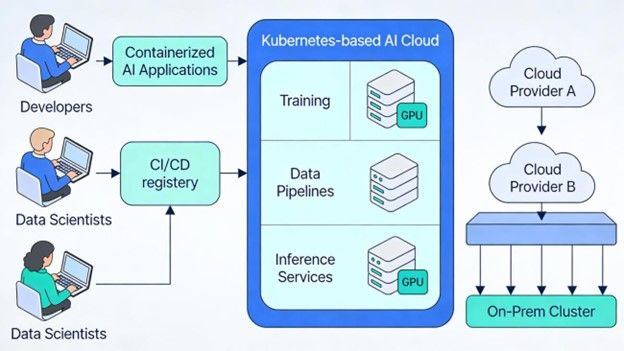 Figure 1: Figure 1: High-level Kubernetes-based AI Cloud architecture enabling developers and data scientists to push containerized AI applications across multiple cloud providers
Core Kubernetes Capabilities for AI
Kubernetes offers five critical capabilities for cloud-native AI systems:
-
Container Standardization - Package models and pipelines as Docker containers for consistent, portable deployment across environments
-
Automated Orchestration - Deploy, scale, and self-heal AI services automatically, eliminating manual infrastructure management
-
Multi-Cloud Portability - Run identical containerized applications on AWS, GCP, Azure, on-premises clusters, and hybrid environments with minimal modifications[1][3]
-
Stateful Workload Support - Native support for distributed training jobs, persistent model storage, and distributed data processing
-
Built-in Observability - Comprehensive monitoring of resource utilization (CPU, GPU, memory) and application health metrics
This unified orchestration layer transforms how organizations manage AI infrastructure, reducing operational overhead, accelerating time-to-value, and enabling teams to focus on model development rather than infrastructure management.
Why Kubernetes Fits AI Workloads
Kubernetes' design principles align remarkably well with the fundamental requirements of AI and machine learning systems. Understanding these alignments is critical for platform teams designing AI clouds[2][3].
1. Elastic Scaling for Training and Inference
AI workloads exhibit unpredictable resource consumption patterns:
-
Training jobs consume all available GPUs for hours or days, then complete suddenly
-
Inference services experience quiet periods interrupted by traffic spikes during business peaks
-
Batch processing requires variable resources depending on data volume and complexity Kubernetes' autoscaling capabilities address this variability with three key components:
-
Horizontal Pod Autoscaler (HPA) - Monitors CPU, GPU utilization, or custom metrics; dynamically adjusts pod replica counts
-
Cluster Autoscaler - Provisions new nodes when pods cannot be scheduled; removes idle nodes to reduce costs
-
Custom Metrics - Application-specific signals (queries per second, inference latency, training loss) enable intelligent scaling decisions[1][3]
This elasticity ensures clusters grow during resource-intensive phases and shrink during quiet periods, optimizing both cost and utilization.
2. Self-Healing and High Availability
Production AI systems cannot tolerate downtime. A model serving inference must remain available despite infrastructure failures. Kubernetes provides automatic recovery:
-
Automatic Pod Rescheduling - When a pod or node fails, Kubernetes reschedules it on healthy nodes automatically
-
Multi-Replica Deployments - Distribute load across multiple pod instances for built-in redundancy
-
Health Probes - Readiness and liveness checks ensure only healthy pods receive traffic
-
Graceful Shutdown - Containers finish in-flight requests before terminating, preventing data loss[2]
For healthcare organizations running medical imaging models or financial institutions running fraud detection, this automatic self-healing is non-negotiable.
3. Multi-Environment Portability
AI initiatives increasingly span multiple environments: development laptops, on-premises data centers, public clouds, and edge devices. Kubernetes enables "write once, deploy anywhere":
-
Cloud Portability - Same container images and manifests run on GKE, EKS, AKS, and self- managed clusters
-
Hybrid Deployments - Sensitive workloads stay on-premises while burst capacity scales in public clouds
-
Multi-Cloud Strategy - Reduce vendor lock-in and optimize for cost, compliance, and performance across providers[3]
This portability is critical for organizations with data residency requirements or those pursuing multi- cloud strategies for business continuity.
4. Cost Optimization for Expensive Accelerators
GPUs and specialized accelerators represent significant expenses—a single A100 GPU can cost thousands monthly. Kubernetes maximizes utilization:
-
Autoscaling - Provision GPUs only when needed; decommission when idle
-
GPU Sharing - NVIDIA Multi-Instance GPU and time-slicing allow multiple workloads per GPU safely
-
Spot Instances - Run non-critical training on cheaper, interruptible hardware
-
Resource Quotas - Prevent single tenants from monopolizing expensive resources[1][3]
Organizations can increase GPU utilization from 30-40% to 70-80%, translating to significant cost savings and improved ROI.
GPU and Accelerator Management on Kubernetes
Modern AI depends on specialized hardware: GPUs from NVIDIA, AMD, or Intel; TPUs from Google; or custom accelerators. Unlike CPUs and memory, accelerators cannot be overcommitted—they must be scheduled as discrete, indivisible resources[1][2].
Understanding GPU Scheduling
How GPU Scheduling Works
GPU vendors provide device plugins (notably the NVIDIA Device Plugin) that register GPUs as named resources such as nvidia.com/gpu on cluster nodes. The Kubernetes scheduler tracks availability and places pods appropriately[1].
When a pod specifies GPU resource requests:
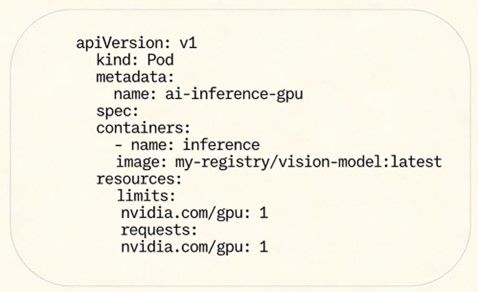
The scheduler applies placement policies for optimal performance:
-
Node Affinity - Place pods on specific node types or locations
-
Pod Affinity - Co-locate related pods for performance
-
Topology Awareness - Minimize inter-GPU communication overhead
-
Taints and Tolerations - Reserve GPUs for specific workloads
Key GPU Scheduling Characteristics
-
GPUs cannot be overcommitted; one pod per GPU (unless using sharing techniques)
-
Requests and limits must be identical (non-compressible resources)
-
Topology awareness optimizes multi-GPU distributed training
-
Device plugin handles driver-level GPU allocation and monitoring
GPU Operator and Advanced Sharing
Manual GPU driver installation is error-prone and expensive. The NVIDIA GPU Operator automates drivers, runtimes, and monitoring as Kubernetes-native operators[2].
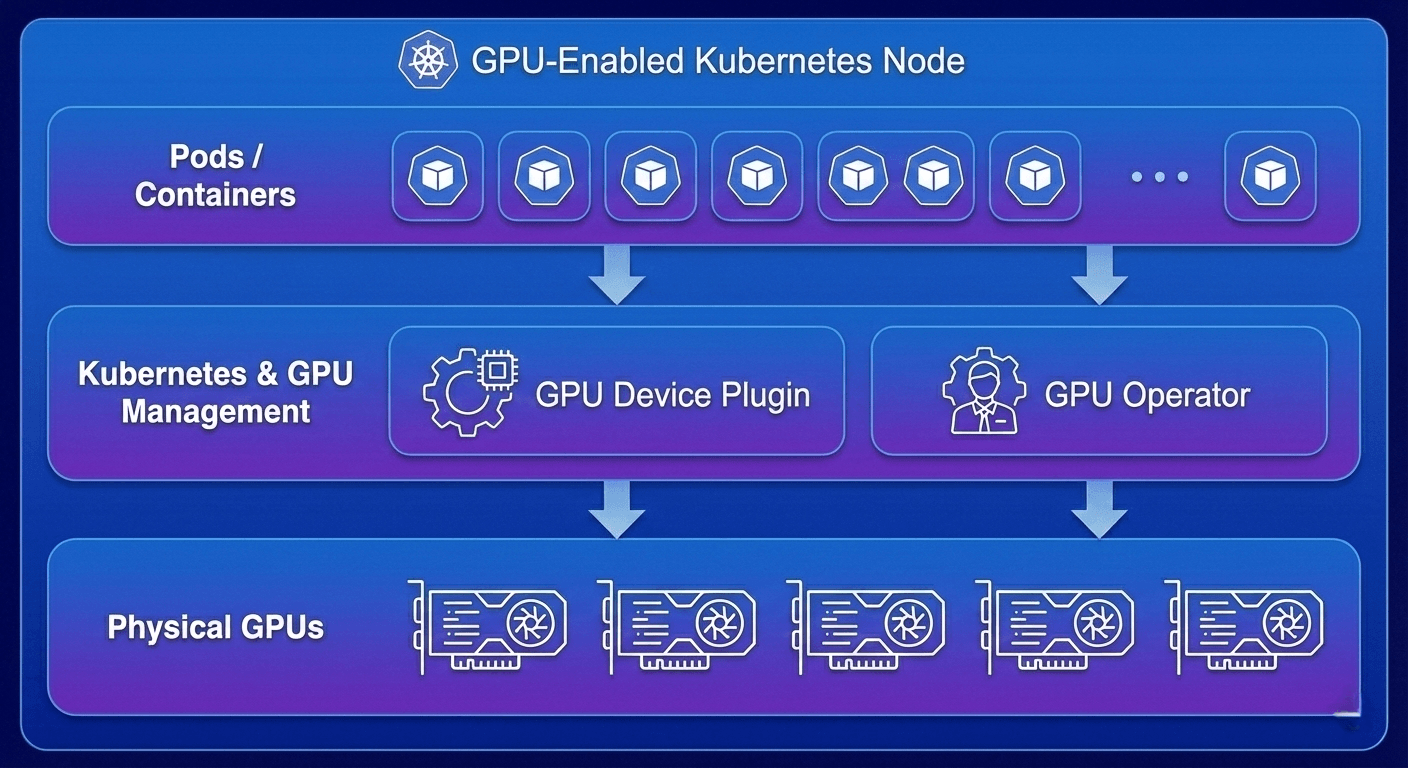 Figure 2: Figure 2: GPU-enabled Kubernetes node architecture: containerized workloads managed by device plugin and operator, abstracted from physical GPUs
Advanced GPU Sharing Strategies
Modern GPU operators enable sophisticated sharing:
-
Multi-Instance GPU (MIG) - Partition A100/H100 GPUs into smaller, independent instances with dedicated resources
-
Time-Slicing - Multiple pods share a single GPU sequentially; multiplexer manages context switching
-
Resource Isolation - Strict limits prevent one pod from impacting others' performance
-
Health Monitoring - Expose temperature, power, utilization metrics to Prometheus and observability tools[2]
These strategies enable safe multi-tenant GPU sharing while maintaining performance isolation and predictability.
Kubernetes for MLOps Pipelines
Production AI extends far beyond models. Modern systems comprise intricate pipelines moving data through ingestion, transformation, training, evaluation, and serving stages. Each stage has different compute requirements and frameworks[3][4].
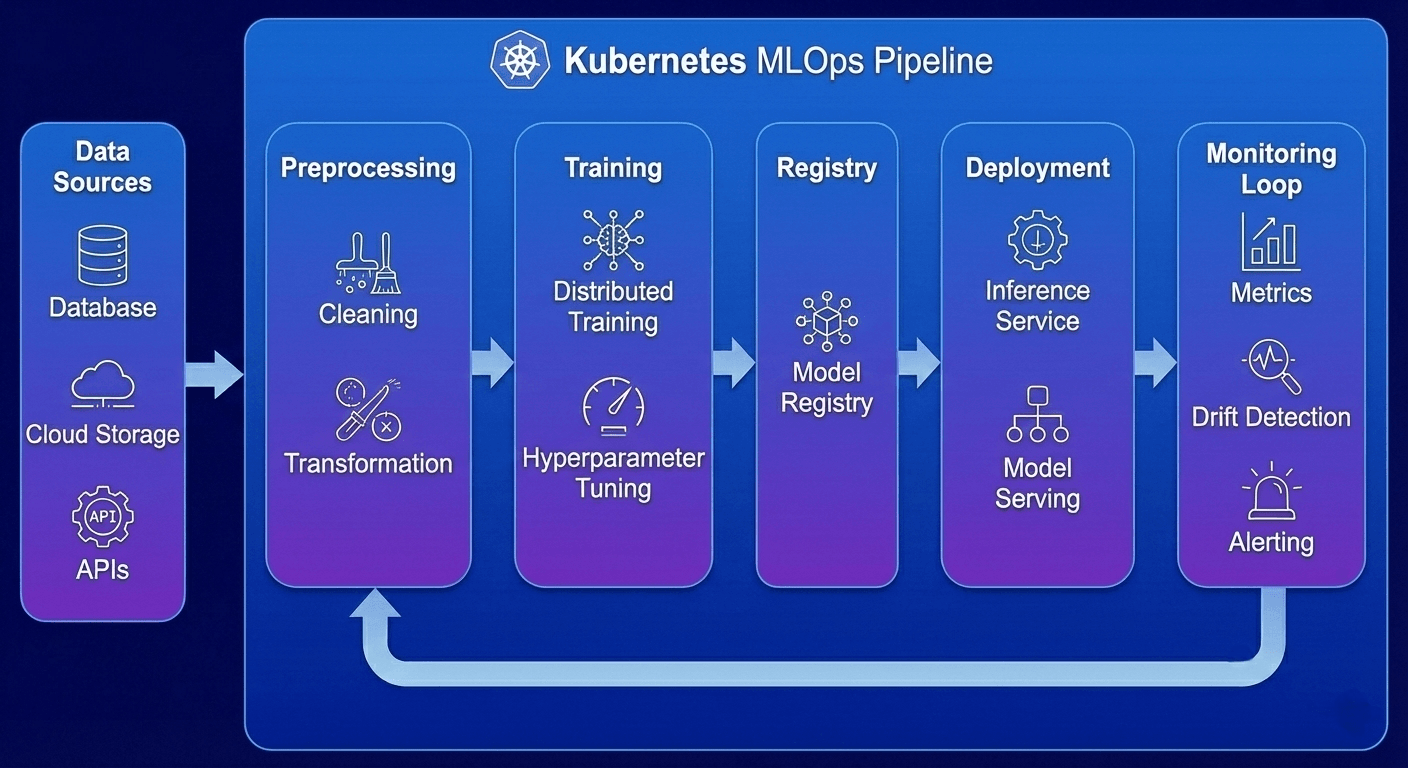 Figure 3: End-to-end MLOps pipeline on Kubernetes: data sources → preprocessing →model training → registry → deployment → continuous monitoring with retraining feedback loops
A Production-Grade AI Cloud Architecture
Stage 1: Data Ingestion & Preprocessing
Raw data collection, cleaning, and feature engineering:
-
Batch Processing - Spark, Flink, Beam running as containerized Kubernetes jobs
-
Streaming - Real-time data pipelines processing continuous sources
-
Orchestration - Kubeflow Pipelines and Argo Workflows coordinate multi-stage transformations
-
Reliability - Automatic retry and failure recovery ensures pipeline completion[3][4]
Stage 2: Model Training & Experimentation
Compute-intensive training with hyperparameter exploration:
-
Distributed Training - PyTorch, TensorFlow, JAX across multiple GPUs and nodes
-
Job Management - Custom operators handle failures and resource allocation automatically
-
Hyperparameter Tuning - Launch hundreds of parallel experiments efficiently
-
Experiment Tracking - Integrate with MLflow, Weights & Biases for metrics and reproducibility[3][4]
Stage 3: Model Packaging & Registry
Version control and artifact management:
-
Container Registry - Store model images with inference code
-
Model Registry - Track versions (MLflow, Kubeflow, vendor registries)
-
CI/CD Automation - Automatically build, test, and publish artifacts
-
Quality Gates - Validation ensures production-readiness[3][4]
Stage 4: Model Serving & Inference
Deliver predictions to applications:
-
Microservices - FastAPI, gRPC, TensorFlow Serving as containers
-
Network Abstraction - Kubernetes Services provide stable endpoints
-
Advanced Routing - Seldon Core, KServe enable A/B testing and canary rollouts
-
Autoscaling - Automatically scale replicas with request load[3][4]
Stage 5: Monitoring & Continuous Improvement
Track performance and trigger retraining:
-
Resource Metrics - CPU, GPU, memory utilization and trends
-
Application Metrics - Latency, throughput, error rates, and SLA compliance
-
Data Metrics - Feature distributions, data drift, and model drift detection
-
Automated Actions - Trigger retraining when performance degrades[3][4]
This integrated MLOps architecture transforms ML from ad-hoc experimentation into production- grade systems with reliable operations, continuous improvement, and measurable business impact.
Using Kubernetes for AI Training at Scale
Training large language models and distributed systems requires orchestrating compute across multiple GPUs and nodes. Kubernetes provides native support for sophisticated distributed patterns[2][3].
Distributed Training Job Management
Operators such as Kubeflow's TFJob and PyTorchJob abstract distributed training complexity:
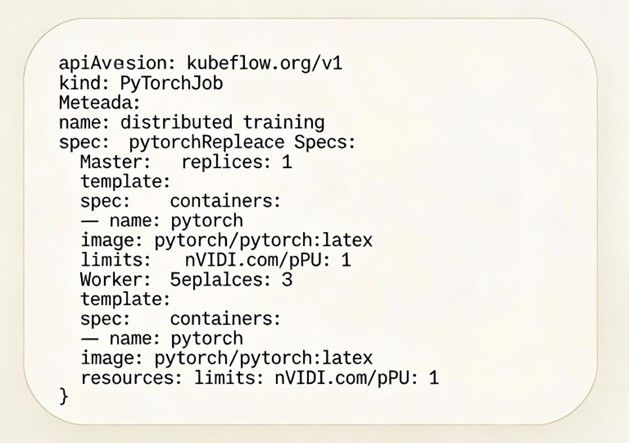
What Training Operators Manage
-
Pod Lifecycle - Create master and worker pods in proper order with dependencies
-
Networking - Expose master pods for secure worker communication
-
Failure Handling - Restart failed pods and resume training automatically
-
Resource Verification - Ensure GPUs available before scheduling[2][3]
Data Access and Storage
Training jobs require massive datasets—terabytes in many cases. Kubernetes storage abstractions enable:
-
PersistentVolumes - Declarative storage mounting and lifecycle management
-
Cloud Storage Integration - S3, GCS, Azure Blob via CSI drivers
-
High-Performance Storage - NVMe and local SSD for data locality
-
Dataset Versioning - Reproducible training with specific data snapshots[3][4]
Autoscaling Training Workloads
Experiment queues drive automatic cluster scaling:
-
Job Queues - Kafka, RabbitMQ, or Kubernetes queues capture experiments
-
Custom Controllers - Monitor queue depth and launch training jobs
-
Cluster Autoscaler - Provision GPU nodes as pending jobs exceed capacity
-
Cost Optimization - Burst to spot instances for non-critical experiments[2][3]
Researchers submit experiments that execute automatically when resources become available, eliminating GPU wait times.
Kubernetes for AI Inference and Inference as a Service
The primary user-facing AI component is inference: delivering predictions in real-time or batch. Kubernetes makes models reliable, scalable, and production-grade[2][5].
Real-Time Inference Microservices
Models are containerized as microservices exposing REST or gRPC endpoints:
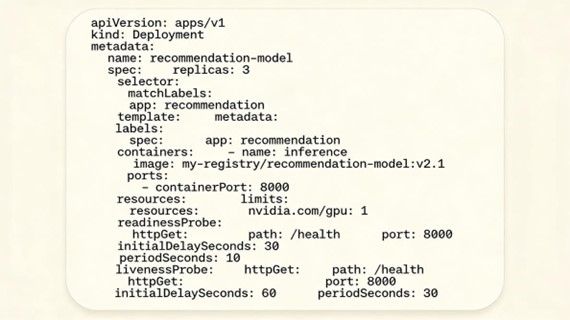
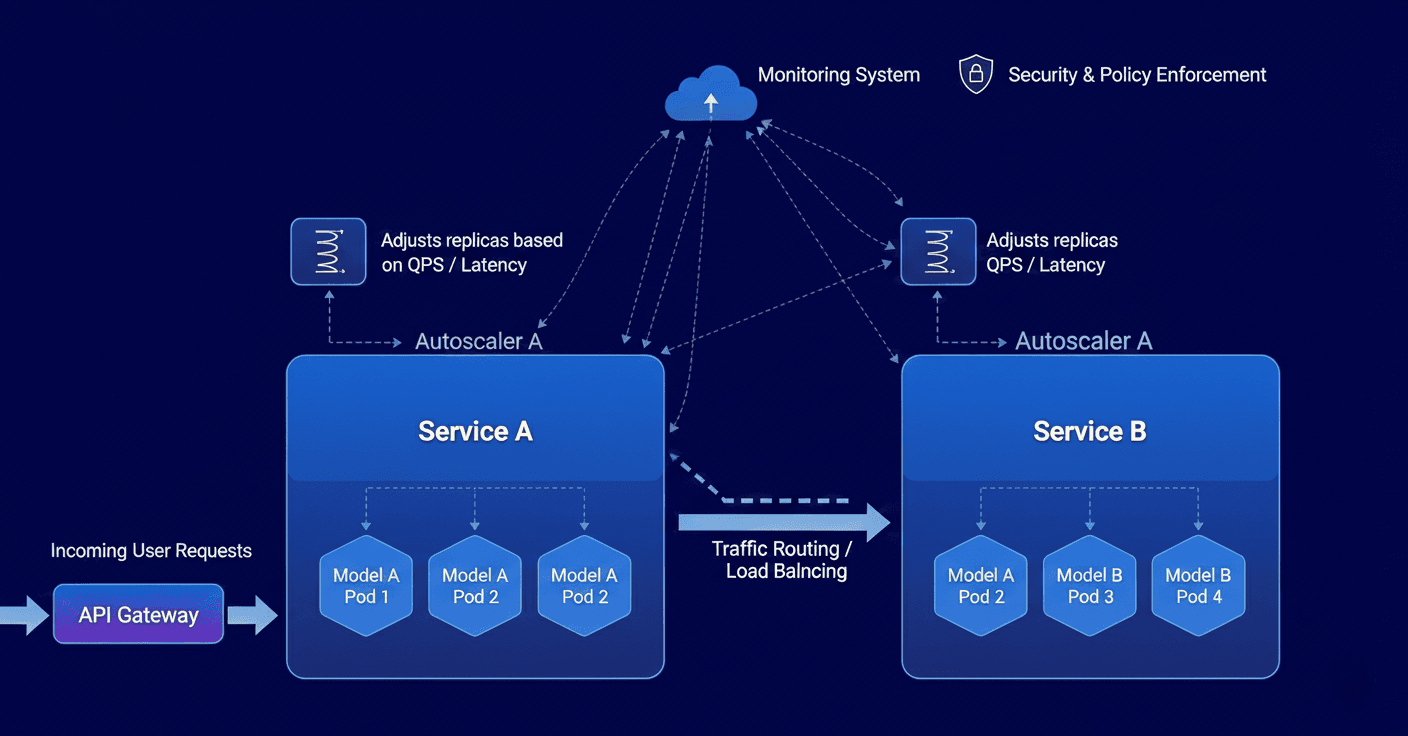 Figure 4: Kubernetes inference serving: model pods behind Services and API gateways; autoscalers adjust replicas based on throughput and latency
Kubernetes Abstractions for Inference
-
Services - Create stable network endpoints for pod groups
-
Ingress/API Gateway - Route external requests to appropriate services
-
Horizontal Pod Autoscaler - Scale replicas based on metrics (requests/sec, latency)
-
NetworkPolicy - Control traffic and enforce security boundaries[2][5]
Batch Inference for Large-Scale Predictions
Process large datasets asynchronously:
-
Kubernetes Jobs - Orchestrate one-time batch inference runs
-
CronJobs - Schedule recurring inferences (daily fraud scoring, weekly recommendations)
-
Workflow Engines - Coordinate complex pipelines with conditional logic[3][4]
Inference as a Service (IaaS) Platforms
Build internal platforms abstracting models behind common APIs:
-
Multi-Model Serving - Single service hosts multiple models with smart routing
-
Model Versioning - A/B test via canary deployments; gradually shift traffic
-
Independent Scaling - Scale models based on individual demand patterns
-
Unified Observability - Centralized logging, metrics, and tracing[2][5]
Production Readiness Features
-
Readiness Probes - Gracefully handle startup and model loading delays
-
Liveness Probes - Detect and recover from stuck or unhealthy models
-
Graceful Shutdown - Complete in-flight requests before termination
-
Pod Disruption Budgets - Prevent rolling updates from impacting availability[2][5]
Cost and Performance Optimization
AI infrastructure represents one of the largest cloud expenditures. Kubernetes optimizes both cost and performance[1][2][4].
GPU Sharing and Right-Sizing
Underutilized GPUs waste capital. Advanced strategies improve utilization:
-
Time-Slicing - Multiplex workloads on single GPU; context switching managed automatically
-
MIG Partitioning - Divide A100/H100 GPUs into independent slices with dedicated resources
-
Resource Limiting - Cap GPU memory per workload; prevent starvation
-
Monitoring - Identify underutilized GPUs; recommend consolidation[1][4]
Effective GPU sharing increases utilization from 40% to 80%, directly improving accelerator ROI.
Intelligent Autoscaling
-
Horizontal Pod Autoscaler - Scale replicas based on CPU, GPU, or custom metrics
-
Cluster Autoscaler - Add/remove nodes based on pod scheduling demands
-
Predictive Scaling - Use historical patterns to proactively provision capacity[1][3]
Spot and Preemptible Instances
Cloud providers offer 60-80% discounts on interruptible instances:
-
Training Jobs - Run non-critical experiments on spot instances
-
Automatic Rescheduling - Kubernetes reschedules interrupted pods automatically
-
Hybrid Pools - Mix stable and preemptible instances; maintain SLA while reducing cost[1][4]
Observability and Chargeback
Kubernetes labels and annotations enable resource attribution:
-
Resource Quotas - Limit consumption per namespace or tenant
-
Usage Metrics - Track CPU, GPU, memory consumption and trends
-
Cost Allocation - Implement chargeback; hold teams accountable[1][2]
These practices transform AI infrastructure from a cost center into a managed, accountable, optimized service.
Designing Your AI Cloud Architecture on Kubernetes
Strategic architectural decisions balance performance, cost, security, and operational complexity[3][4].
Cluster Strategy
-
Environment Isolation - Separate clusters for dev, staging, production reduce risk
-
Workload Isolation - Dedicated clusters for training vs. inference enable independent optimization
-
Geographic Distribution - Multi-region clusters support disaster recovery and reduce user latency
-
Managed Services - GKE, EKS, AKS reduce operational burden; trade-off customization[3][4]
Platform Services Layer
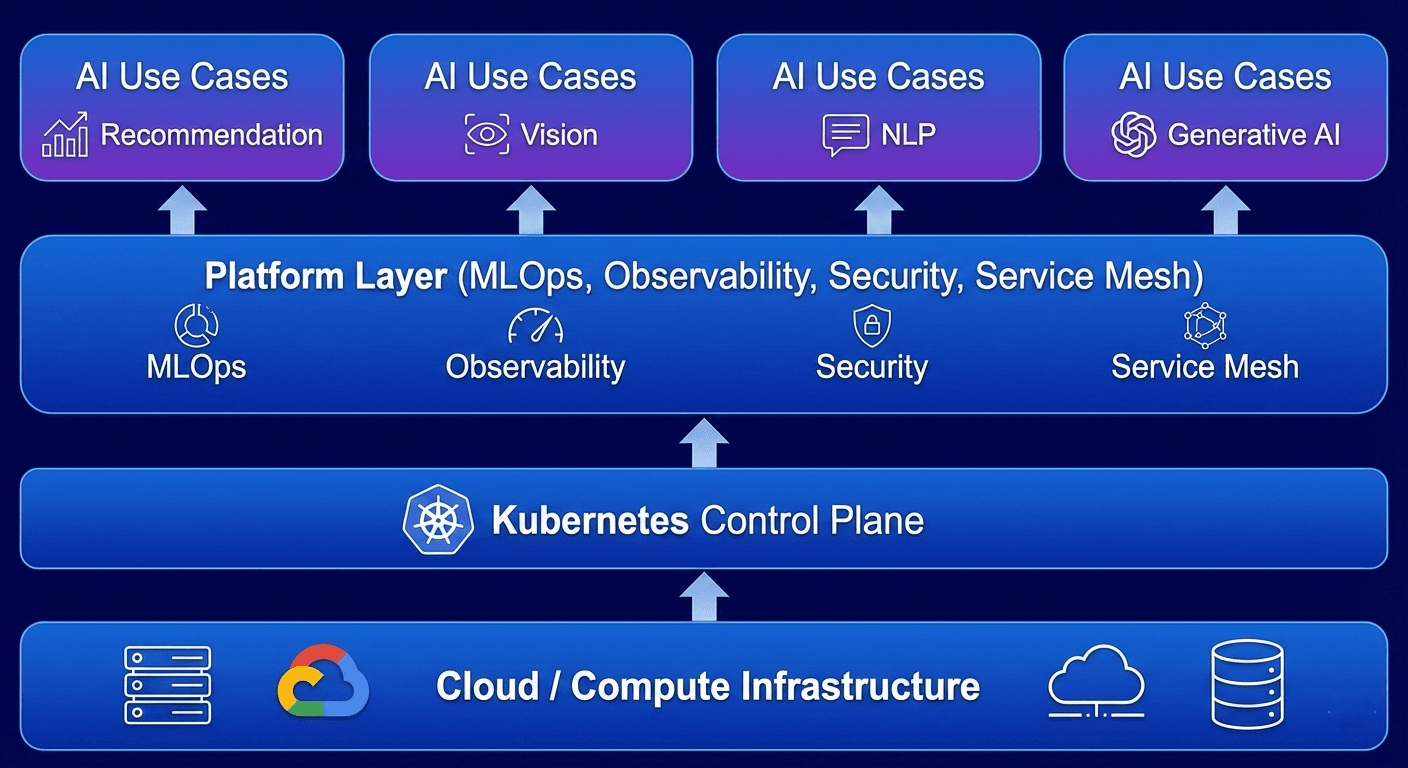 Figure 5: Figure 5: Layered AI platform: cloud compute → Kubernetes → platform services (MLOps, observability, security) → user-facing AI applications
Platform teams add value through:
-
MLOps Tools - Kubeflow, Airflow for pipelines, experiments, model registry
-
Developer Platform - Templates for "deploy model," "run training," "create pipeline"
-
Service Mesh - Istio, Linkerd for traffic management, mTLS, tracing, routing
-
Observability - Centralized logging, metrics, tracing, alerting
-
Security & Compliance - Secrets management, audit logging, network policies, RBAC[3][4]
Multi-Tenancy and Isolation
Multiple teams share infrastructure with built-in isolation:
-
Namespaces - Logical resource separation per team or project
-
RBAC - Fine-grained permission control (who can do what)
-
Network Policies - Restrict traffic between namespaces
-
Resource Quotas - Limit CPU, GPU, memory per tenant[3][4]
Security and Compliance
-
Secret Management - Integrate with KMS (cloud) or Vault (HashiCorp)
-
Network Security - Private clusters, VPC endpoints, network policies
-
Container Security - Image scanning, admission controllers, pod security policies
-
Audit Logging - Track all API calls for compliance and forensics[3][4]
Real-World AI Use Cases on Kubernetes
Organizations across industries prove Kubernetes' effectiveness for production AI[2][3][5].
Healthcare: Medical Imaging at Scale
Medical imaging AI models (radiology, pathology) run as Kubernetes inference services:
-
GPU Processing - Models process studies in seconds on GPU-accelerated nodes
-
Demand-Based Scaling - Autoscaling handles variable workload throughout the day
-
High Availability - Multi-replica deployments ensure 24/7 emergency department availability
-
Continuous Improvement - MLOps pipelines retrain with new data; accuracy improves over time[2][5]
Finance: Real-Time Fraud Detection
Fraud detection models run as ultra-low-latency inference services:
-
Millisecond Analysis - Models analyze transactions instantly; approve/flag in real-time
-
Traffic Handling - Horizontal scaling manages peak shopping period spikes
-
Fault Isolation - Circuit breakers prevent model failures from impacting payments
-
Adaptive Learning - Continuous retraining detects and adapts to fraud patterns[3][5]
Retail: Recommendation and Forecasting
E-commerce platforms use Kubernetes AI for personalization and inventory:
-
Personalization Scale - Recommendation models serve thousands of suggestions/second
-
GPU Efficiency - GPU sharing multiplexes models on accelerators; high utilization
-
Inventory Optimization - Demand forecasting guides planning; reduce stockouts and overstock
-
Experimentation - Canary deployments A/B test algorithms before full rollout[2][3]
Autonomous Systems: Edge-to-Cloud Fusion
Autonomous vehicle platforms orchestrate perception across edge and cloud:
-
Edge Processing - Lightweight, latency-critical models run on vehicle compute
-
Cloud Training - High-resolution sensor data trains models offline in cloud
-
Model Sync - Kubernetes federation maintains consistent versions across edge and cloud[2][3]
Conclusion
Kubernetes has become essential infrastructure for production-scale AI. By providing standardized abstractions for containerized workloads, sophisticated GPU scheduling, elastic scaling, and multi- cloud portability, Kubernetes enables scalable, reliable, cost-effective AI clouds[2][3][4].
Whether deploying medical imaging, fraud detection, recommendations, or autonomous systems, organizations benefit from core Kubernetes capabilities:
-
Automated deployment and versioning
-
Intelligent scaling (pods and clusters)
-
Automatic failure recovery and healing
-
Unified observability and monitoring
-
Cost optimization through resource efficiency
As AI becomes central to competitive advantage, Kubernetes-based infrastructure is a critical strategic investment.
Getting Started
For teams beginning their AI cloud journey:
-
Foundation - Master Kubernetes fundamentals and GPU scheduling
-
Platform Layer - Add managed MLOps tools (Kubeflow, Airflow)
-
Developer Experience - Build templates for common patterns
-
Optimization - Implement cost controls and observability
-
Scale - Expand to multi-cluster, multi-region architectures
This progression creates sustainable, scalable AI systems that grow with organizational needs.
References
[1] Nebius. (2025). Kubernetes: How to use it for AI workloads. Retrieved from
https://nebius.com/blog/posts/how-to-use-kubernetes-for-ai-workloads
[2] CloudZero. (2025). Kubernetes For AI: The CTO's Guide. Retrieved from
https://www.cloudzero.com/blog/kubernetes-for-ai/
[3] Kubernetes Documentation. (2024). Schedule GPUs. Retrieved from
https://kubernetes.io/docs/tasks/manage-gpus/scheduling-gpus/
[4] CloudThat. (2025). Running AI Workloads at Scale on Kubernetes with GPU Management. Retrieved from
[5] Gcore. (2024). 5 Reasons To Use Kubernetes for AI Inference. Retrieved from
About the Author

Chhavinath Sahu
Chhavinath Sahu is a Senior Backend Developer specializing in building scalable, high-performance backend services, APIs, and data-driven systems for large-scale applications. He has strong experience in backend architecture, transactional systems, and system integrations for AI and data-intensive workloads, with working knowledge of cloud-native deployments to ensure reliable server-side operations at scale.
About the Author
Chhavinath Sahu
Chhavinath Sahu is a Senior Backend Developer specializing in building scalable, high-performance backend services, APIs, and data-driven systems for large-scale applications. He has strong experience in backend architecture, transactional systems, and system integrations for AI and data-intensive workloads, with working knowledge of cloud-native deployments to ensure reliable server-side operations at scale.